

Introducing the Hatchable Loop
The course always ended with students presenting a business. Now there is somewhere to present it, back it, sell from it and report on it. Here is how the whole loop works.
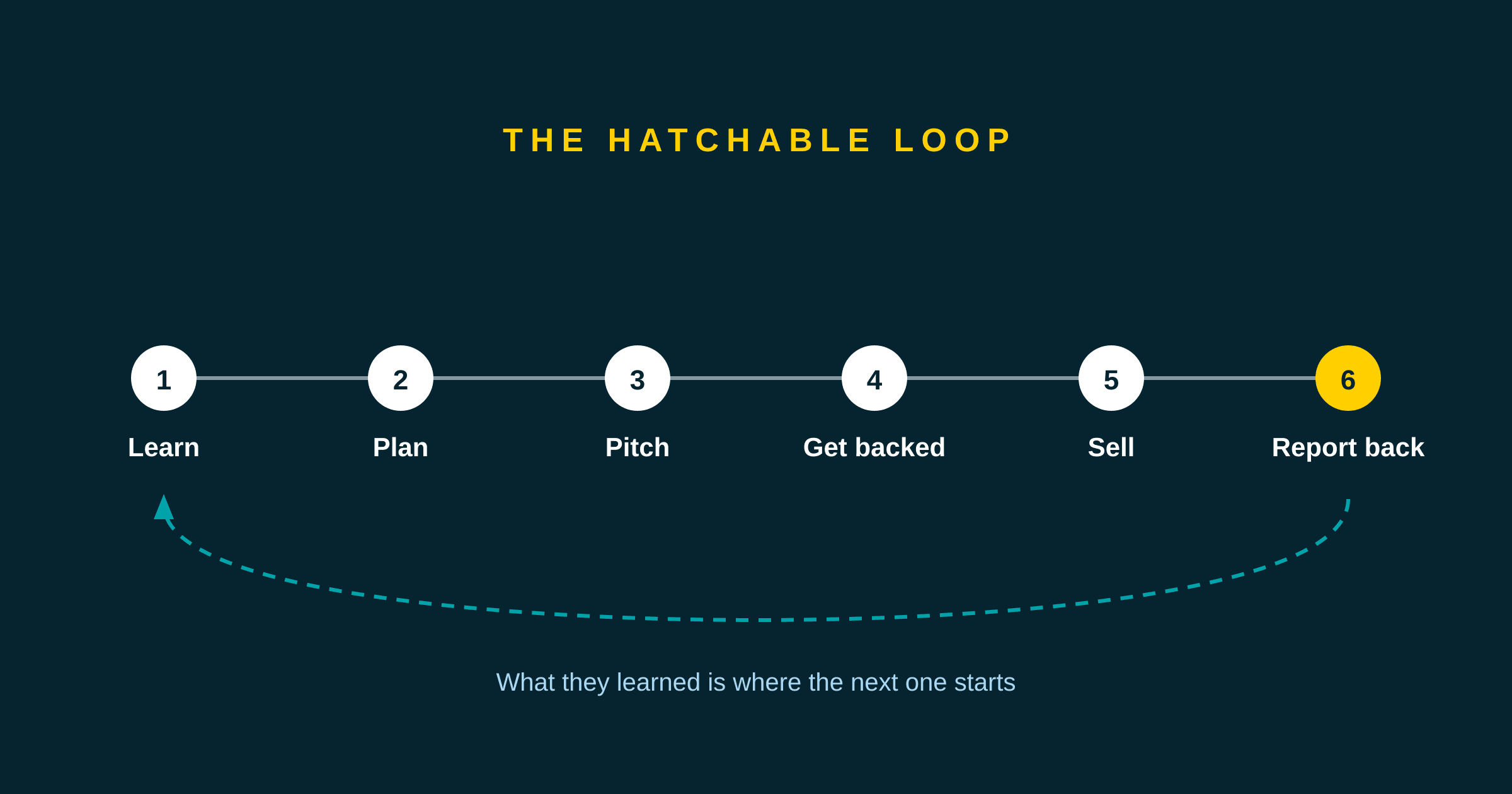
For most of its life, the Hatchable course had a gap at the end of it.
Module 8 asks a student to present their project. It asks them to review the complete business plan they have been filling in since module 3, stand up, and explain it to a room. That is the right way to end a course about entrepreneurship. The problem was that the plan did not exist anywhere. It was scattered across eight modules of assignment submissions, and a student reaching the final module had to reconstruct it by scrolling back through nine months of their own writing.
We have closed that gap, and then kept going past it. A student can now build the plan in one place, share it, record who backs them, sell something, track the money, and write back to the people who supported them. We call it the loop, and this post explains what each part does, who it is for, and the decisions behind it.
The six stages
Learn. Nine modules and 213 lessons. Videos with the written version underneath, worked examples from three recurring students, and quizzes that explain every option rather than only the correct one. Modules 1 to 8 are published in full and can be read without an account.
Plan. The course teaches the Lean Canvas and then, in module 8, asks for a completed one. So the software keeps it. Each box on the canvas is attached to the assignment that produces it, and the student's own submitted answer sits underneath the box, ready to be carried across. It fills in over months rather than in one sitting, and it prints on a single page.
Pitch. A page with the idea, the plan behind it, an optional video, and what the student is asking for. It sits behind a private link.
Get backed. Somebody who knows the student reads the pitch and says they are in for twenty five dollars. Hatchable writes that down. That is the whole of what we do with it.
Sell. A shop page, also behind a private link. Customers choose what they want and reserve it. They pay the student in person when they collect.
Report back. Three questions at the end: what happened, what did you learn, what happens next. The numbers are filled in already because the software knows them. Once published, the report appears at the top of the pitch page, above the ask, so everyone still holding that link sees how it ended.
Who this is for, and what each person actually does
Students, twelve and up
The student is the only person who builds anything. They work through the lessons, hand in assignments, fill in the canvas one box at a time, and decide what to share and with whom.
The part that matters most is the last stage. A project that did not work is a normal outcome, and the report is designed for that case as much as for a successful one. "I priced the cards wrong and nobody bought them" is a better piece of writing, and a better piece of learning, than a sales total.
Teachers, parents and camp leaders
One account type covers all three. It gives you a class list, per-lesson progress rather than a single percentage, and the ability to read what somebody handed in and write back, which sends them an email. There is a pedagogical guide for each of modules 1 to 8.
There is deliberately no mark, no score and no gradebook on assignments. You leave comments. For a club or a camp that is the right shape, and in a classroom it keeps the emphasis on the work rather than the grade.
You can also run a showcase at the end, where students enter their pitch and the room votes. Nothing a student enters is visible to anybody outside the class until you have approved it. That gate is not optional and cannot be turned off.
Backers
Usually family, sometimes a neighbour or somebody from the market. They have no account and never need one. They open a link, read the pitch, and record a pledge with a note if they want to leave one.
They never enter a card, because there is nowhere to enter one. They cannot browse to any other student, because pitch pages are not listed anywhere, are marked so search engines skip them, and do not link to each other.
Customers
Whoever the student sells to. They open the shop link, reserve what they want, and get an order code to show at pickup. They pay the student directly, in person, on the day.
Three decisions worth explaining
No money passes through Hatchable
When somebody pledges, we record a promise. When somebody orders, we record a reservation. The money itself moves the way that family already moves money, and the student marks it received when it arrives.
This is a deliberate design choice rather than a limitation we are working around. It means there is no payment processor in the product, we hold no funds, and we take no fee or commission from anybody.
It also has a consequence that matters more than any of that. Shopify and Etsy both require the account holder to be eighteen, and Square has no provision for minors at all. On those platforms a parent has to be the merchant, accept the terms and carry the tax, which means the young person is helping to run a business that legally belongs to somebody else. Because no payment goes through us, there is no merchant account to open, and a fifteen year old can own their own shop page outright.
The corollary is that we cannot settle a dispute about whether money changed hands. We hold the record the student kept, and nothing more.
A pledge is encouragement, not an investment
Nobody who backs a student receives a share of anything. Nothing on Hatchable is an offer of a security, and we use the words back, support and pledge rather than invest, because the difference is real and not cosmetic.
Private by default
A pitch, a shop and a report are private until the student turns sharing on. The link is unguessable, is not listed anywhere, and is marked so search engines skip it. A student can switch sharing off at any moment, or generate a new link, which immediately breaks every link they have already sent.
Public pages show first names only.
Fitting it to the time you have
Not every group can run nine modules. The loop has natural stopping points, and each one is a real finish line rather than an abandoned course:
| Modules | Lessons | Hand-ins | Where it ends |
|---|---|---|---|
| 1 to 2 | 37 | 4 | They understand what entrepreneurship is |
| 1 to 4 | 83 | 8 | They can pitch, and you can run a pitch night |
| 1 to 6 | 127 | 12 | They can sell, and you can hold a market day |
| 1 to 8 | 185 | 15 | The whole loop, including the report |
Count assignments rather than weeks. Videos are short and a group can watch several in one sitting, but an assignment usually takes a session on its own.
What the platform does not do
Being straight about this is more useful than a feature list.
There is no school or district account. Each teacher has their own class, and a principal cannot see across teachers. There is no Google Classroom or Clever integration, so a class is invited by link or by pasting addresses. We have not published a mapping to any provincial curriculum document. There is no native app, which is deliberate, because the backer flow is a grandparent tapping a link in a text message and an app store download would break the one part of this that cannot afford friction.
Module 9 covers personal finance. Its lessons are written but the videos are not filmed yet, and it is the one module without a teacher guide. The course videos carry only YouTube's automatic captions, which nobody has checked or corrected. Machine captions are not accurate enough to count as accessible, so that is the gap we consider most serious and the one we would fix first.
Have a look at it
Every screen described here is shown, with a screenshot of each, on the platform page. The course itself is at /learn, where modules 1 to 8 can be read in full without signing up, so you can see the real material before deciding whether it fits your classroom, your camp or your kitchen table.
If something your group needs is missing, we would rather hear the requirement than guess at it. The list above is what we would work on next.