
The platform, screen by screen

Hatchable is a course and a set of tools for the thing the course asks students to build. This page shows the actual screens, in the order a student meets them, and sets out what each of the four kinds of person can and cannot see.

Every image below is a screenshot of the running application. The venture in them is Jenny's, one of the three worked-example students the course uses, so the words are sample content rather than a real child's work.

The loop

The course was already a build-a-business path that ends in a presentation. The software exists so the thing being presented actually exists somewhere.

The six steps, and the loop backLearn, then plan, then pitch, then get backed, then sell, then report back. The report feeds back to the people who backed the student, which is where the next idea usually starts.1Learn2Plan3Pitch4Get backed5Sell6Report backWhat they learned is where the next one starts
1Modules 1 to 9

Learn

Every lesson has its own page. A video, the written version underneath, and for assignments three worked examples from Aisha, Jacob and Jenny so a student can see three different ways of answering before writing their own. Quizzes mark themselves and explain every option, including the ones nobody picked.

A lesson page showing the video player, the lesson title and the written transcript below it.
A lesson in module 1. Modules 1 to 8 are readable without an account.
2Built up from module 3 to module 8

Plan

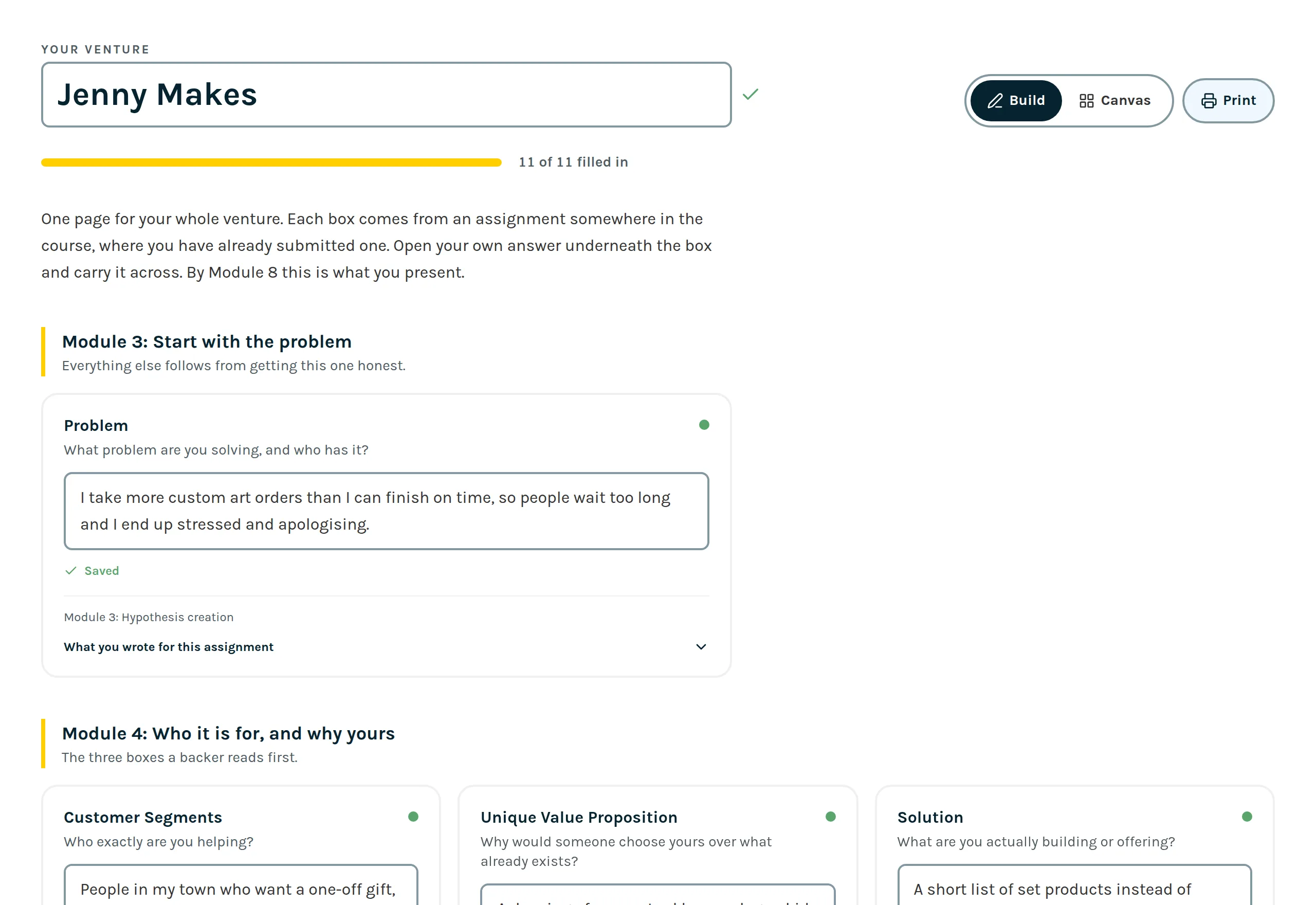
The course teaches the Lean Canvas and then asks, in module 8, for a completed one. So the software keeps it. Each box is attached to the assignment that produces it, and a student's own submitted answer sits underneath the box, ready to carry across. It fills in over months rather than in one sitting.

The canvas builder, showing a project name, a progress bar reading eleven of eleven filled in, and editable boxes grouped by section.
The builder. Each box says which assignment it came from.
3Module 8 onward

Pitch

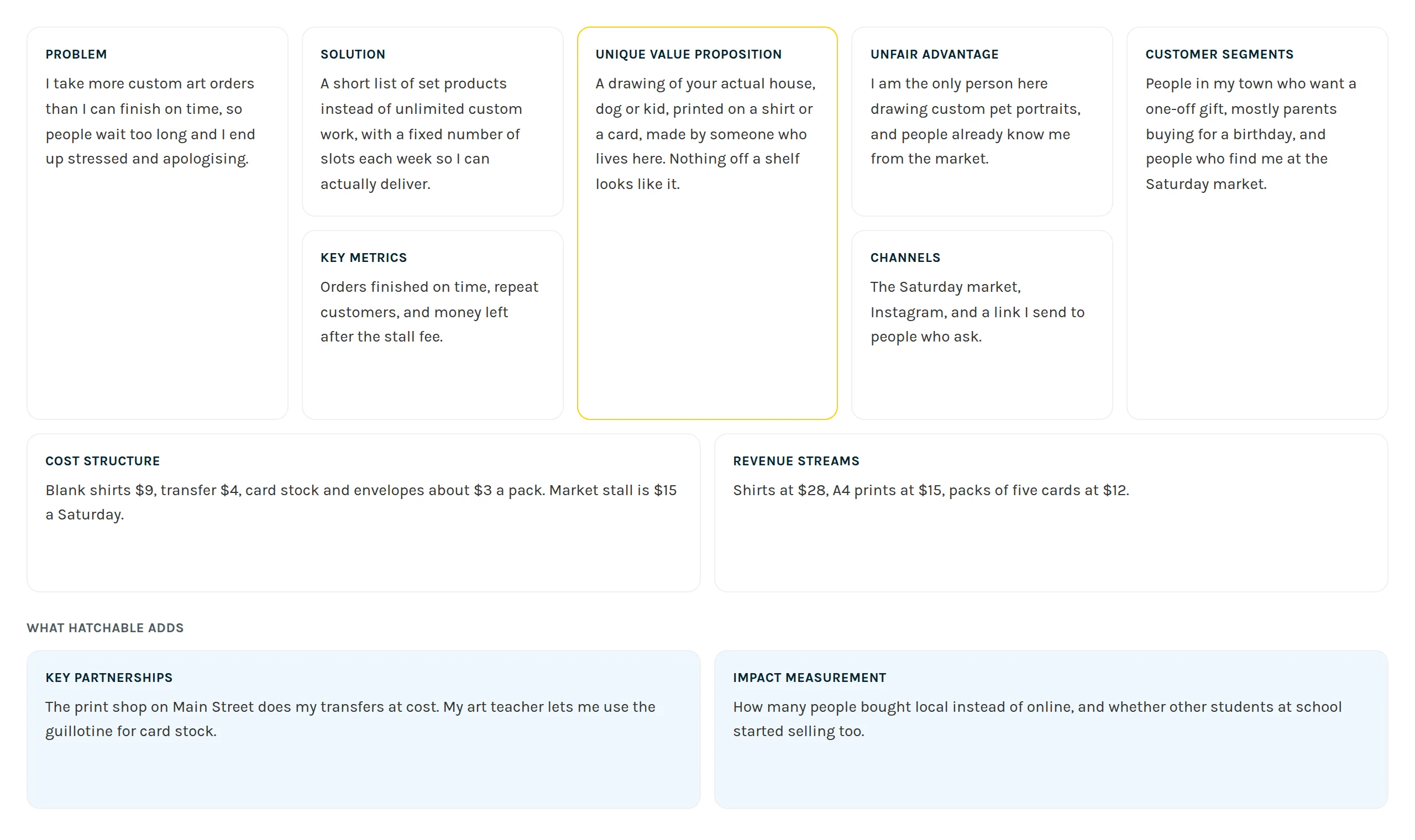
The same canvas, printable on one page, and a pitch page behind a private link. The link is unguessable, is not listed anywhere, and is marked so search engines skip it. A student can switch sharing off or generate a new link, which immediately breaks every link they already sent.

The finished one page Lean Canvas, with problem, solution, unique value proposition, unfair advantage, customer segments, key metrics, channels, cost structure and revenue streams laid out in a grid.
The same answers, on one page. This is what gets printed and presented.
4After the pitch is shared

Get backed

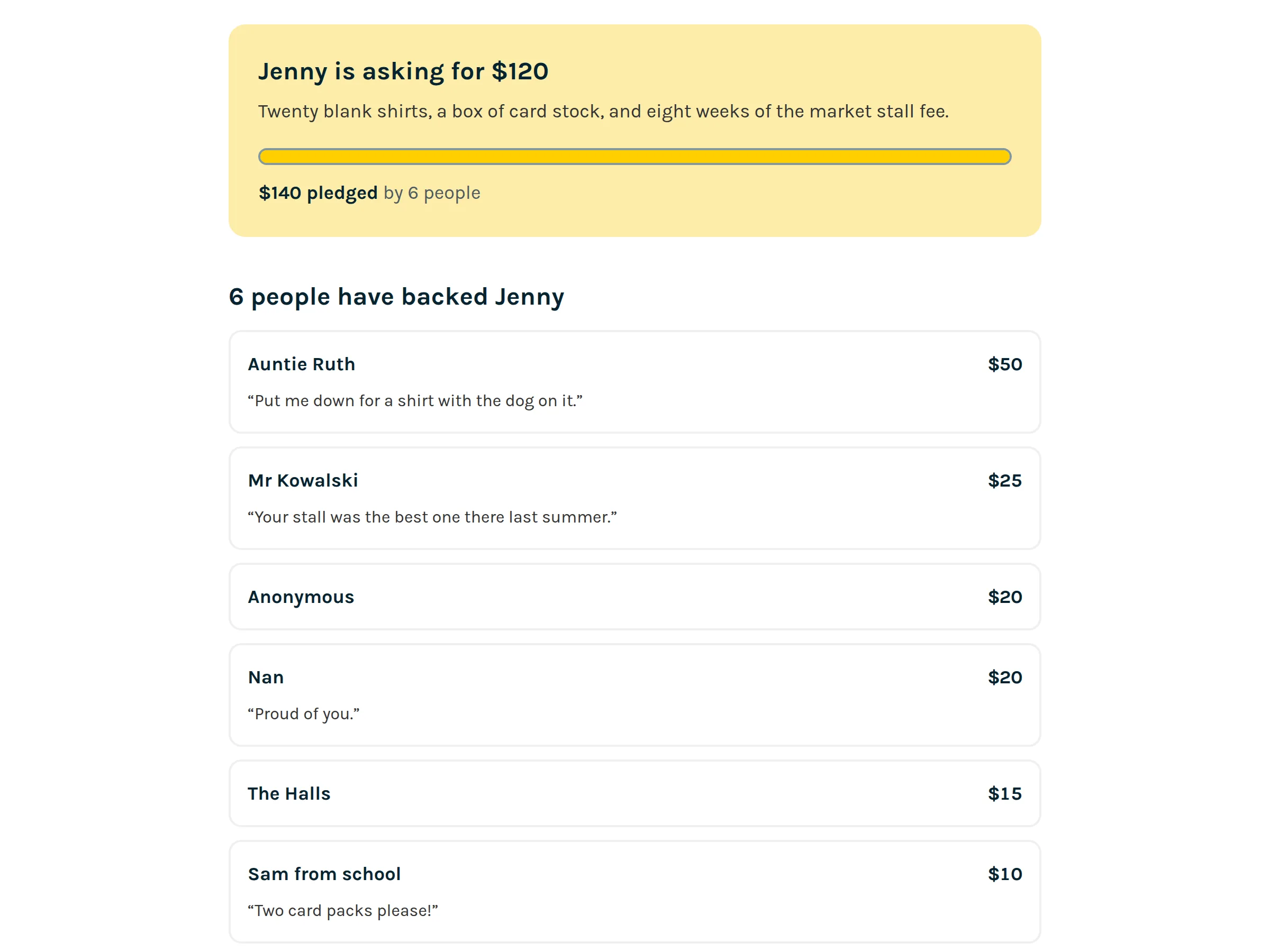
Somebody watches the pitch and says they are in for $25. Hatchable writes that down and nothing else. The money moves the way that family already moves money, and the student ticks it off when it arrives. A pledge is encouragement, not an investment, and nobody who backs a student gets a share of anything.

A pitch page showing the amount asked for, a progress bar, the total pledged, and a list of backers with their names, amounts and short notes.
What a backer sees. Names and notes appear only if the backer left them.
5Modules 5 and 6 onward

Sell

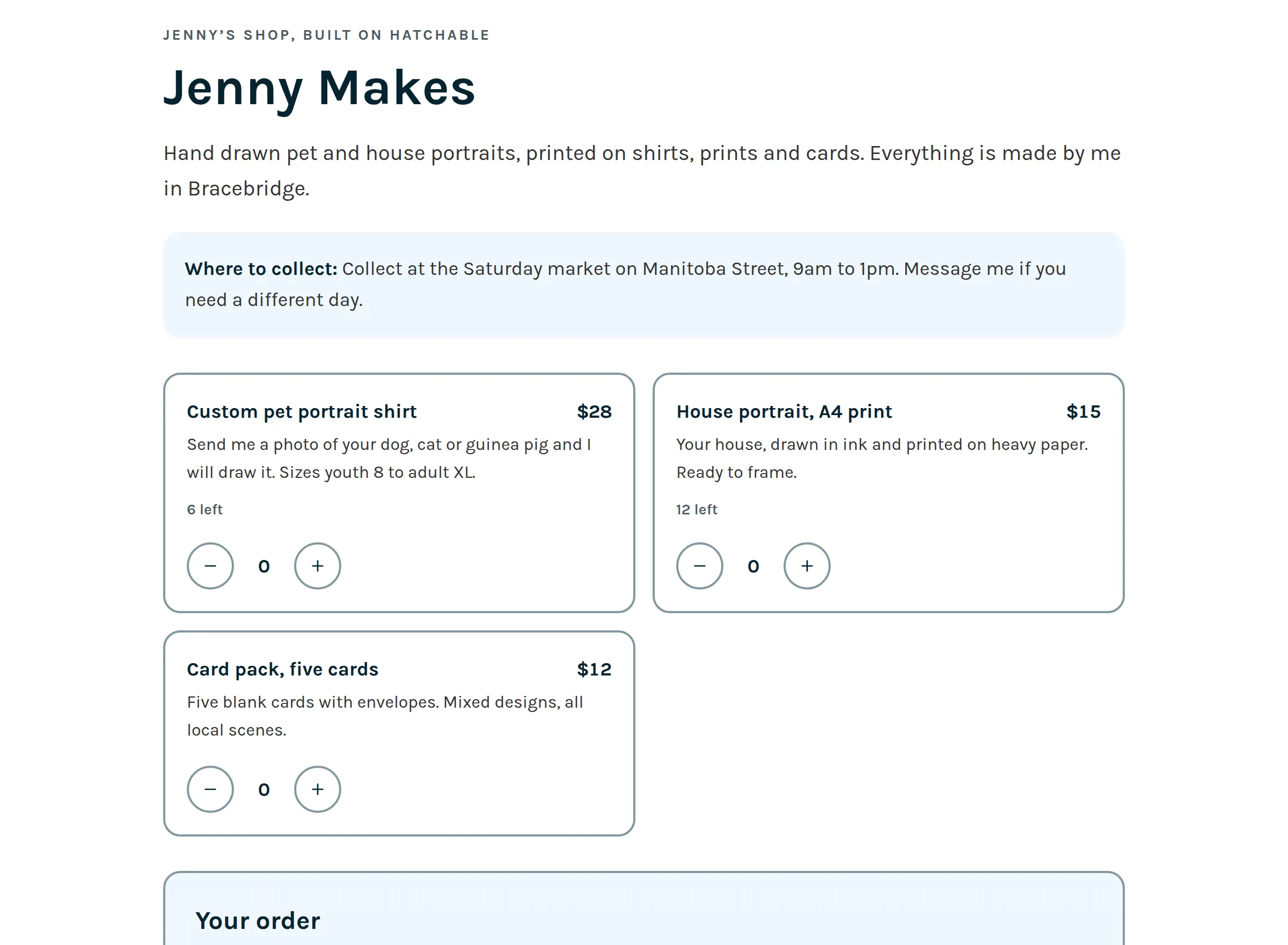
A shop page, also behind a private link. Customers choose what they want and reserve it. There is no card and no checkout anywhere in this flow. They pay the student in person when they collect, which is how a school fair has always worked, and is the reason a fifteen year old can run this without an adult holding the account.

A student shop page listing three products with prices, short descriptions and how many are left, plus pickup details.
The shop as a customer sees it. Reservations only, paid at pickup.
6Module 8 final assignment

Report back

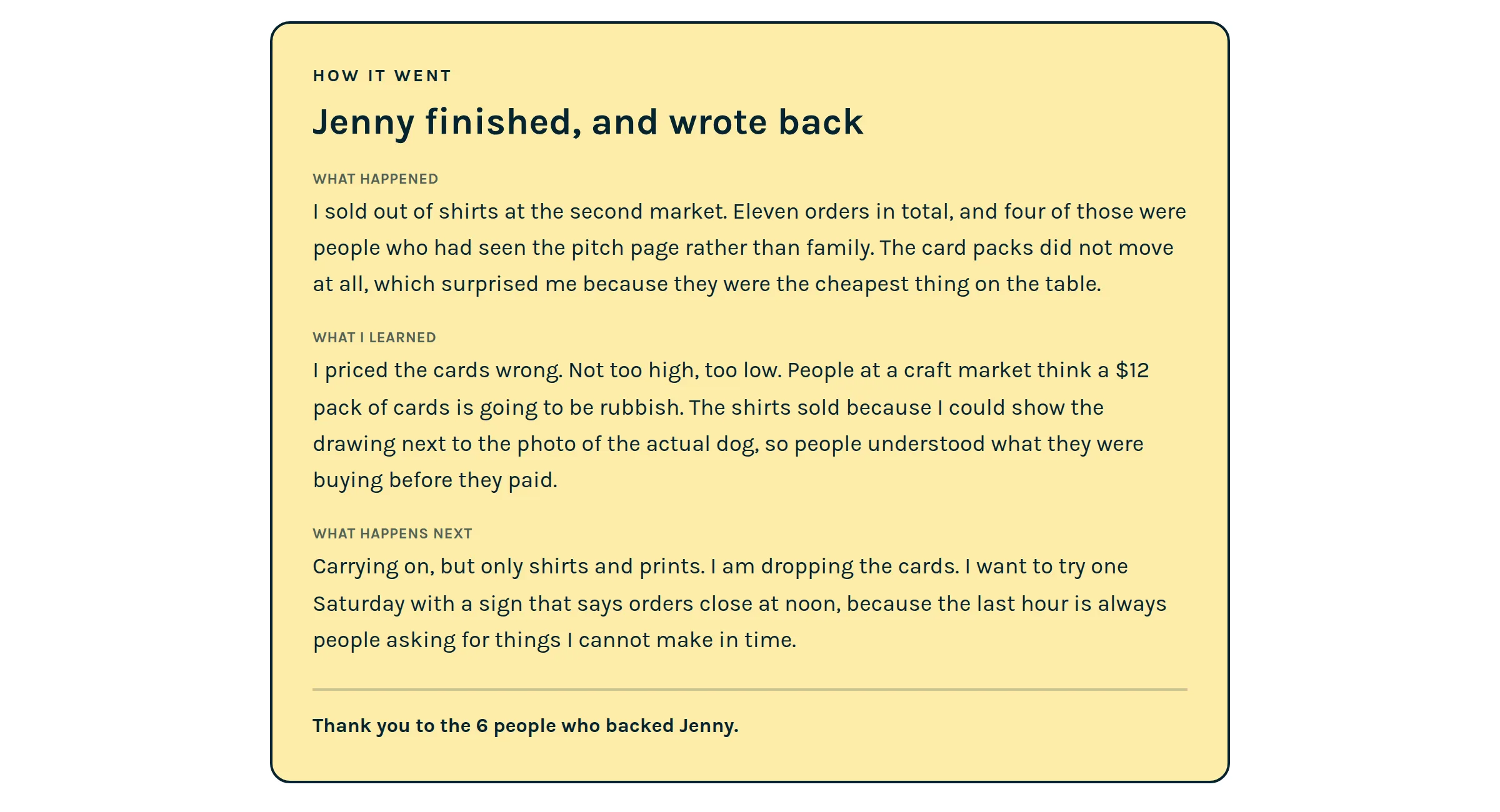
Three questions. What happened, what did you learn, what next. The numbers are already filled in because the software knows them. Once the student publishes it, everyone still holding the pitch link sees it at the top of the page, above the ask. A project that did not work is a normal thing to have to write about.

A published report at the top of a pitch page, with sections for what happened, what I learned and what happens next, and a thank you to the people who backed the student.
The report sits above the ask, so backers see the ending first.

And a page that adds it up

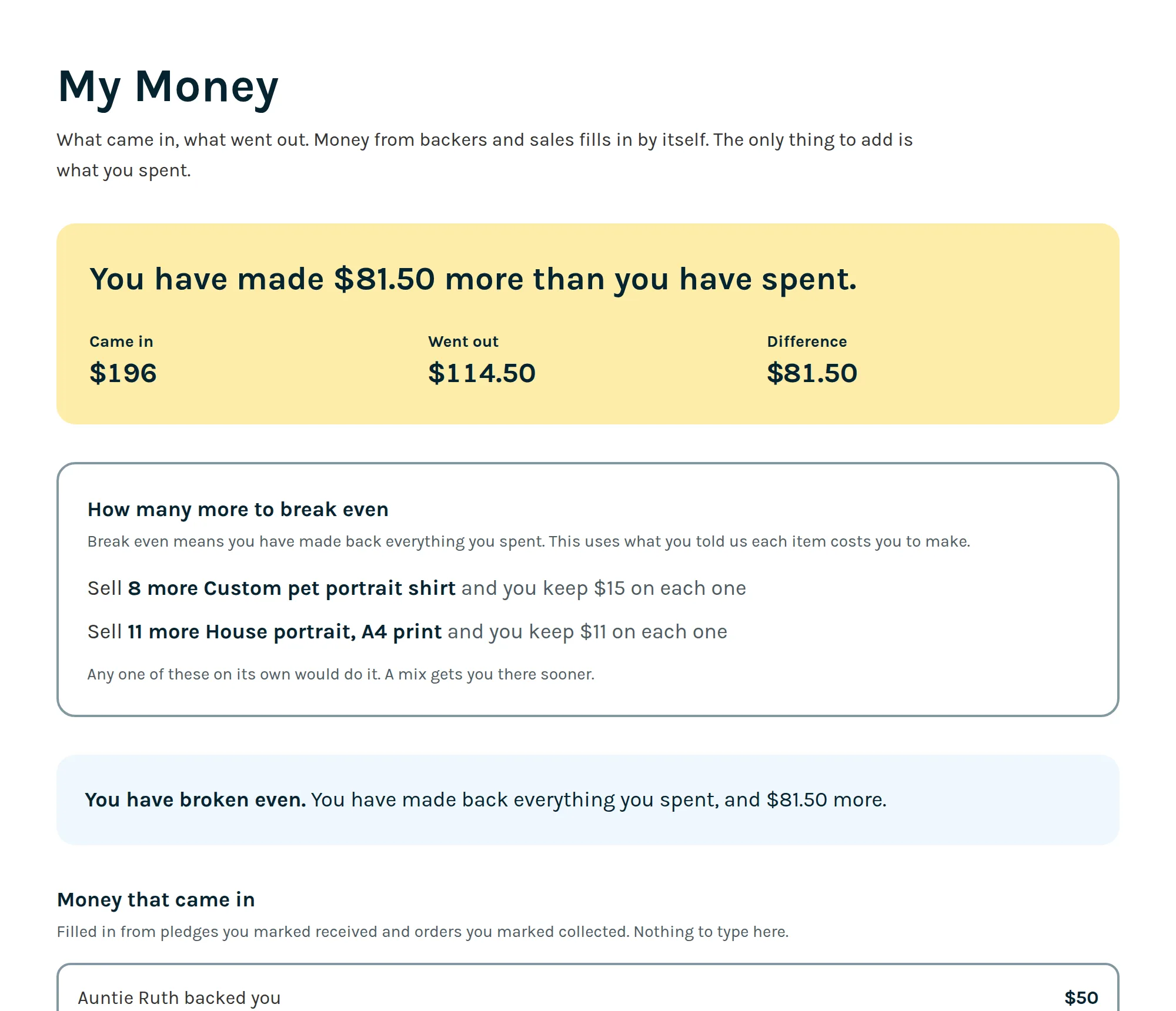
Money in is assembled by the software from pledges the student marked received and orders they marked collected. The only thing they type is what they spent. It works out the difference, including when the difference is negative, which it usually is at the start, and how many more of each thing they would need to sell to break even.

Backers can see a summary of this by default. The student can switch that off.

A money page showing came in, went out and the difference, a break even calculation for two products, and the list of pledges that made up the income.
The money page, with the break even worked out.

Four kinds of person, two of them without accounts

The second pair matters more than it looks. Backers and customers arrive through a link a young person sent them, so what they can reach is deliberately narrow.

The student

12 and up

Has an account
  • Works through the lessons and hands in assignments
  • Fills in the business plan, one box at a time
  • Shares a pitch page and records who backed them
  • Opens a shop page and takes reservations
  • Records what they spent, and writes the final report

What they cannot do. Cannot see another student's work, and cannot see anything a teacher writes about anyone else.

The teacher, parent or camp leader

One account type covers all three

Has an account
  • Sees which lesson each person in the group finished, and when
  • Reads what they handed in and writes back, which emails them
  • Reads a teacher guide for each of modules 1 to 8
  • Invites a group with one link or a list of addresses
  • Runs a showcase and approves every entry before anyone sees it

What they cannot do. Cannot see another teacher's students. There is no school-wide view, because we have not built one.

The backer

Usually family, or someone local

No account
  • Opens a link a student sent them, often in a text message
  • Watches the pitch and reads the plan behind it
  • Records a pledge, with a note if they want one
  • Sees the report when the student publishes it

What they cannot do. Never enters a card, because there is nowhere to. Cannot find any other student, because pitch pages are not listed and do not link to each other.

The customer

Whoever the student sells to

No account
  • Opens the shop link, picks items and reserves them
  • Gets an order code to show at pickup
  • Pays the student in person when they collect

What they cannot do. Never enters a card either. No payment goes through Hatchable at any point, so there is nothing to refund and no funds held.

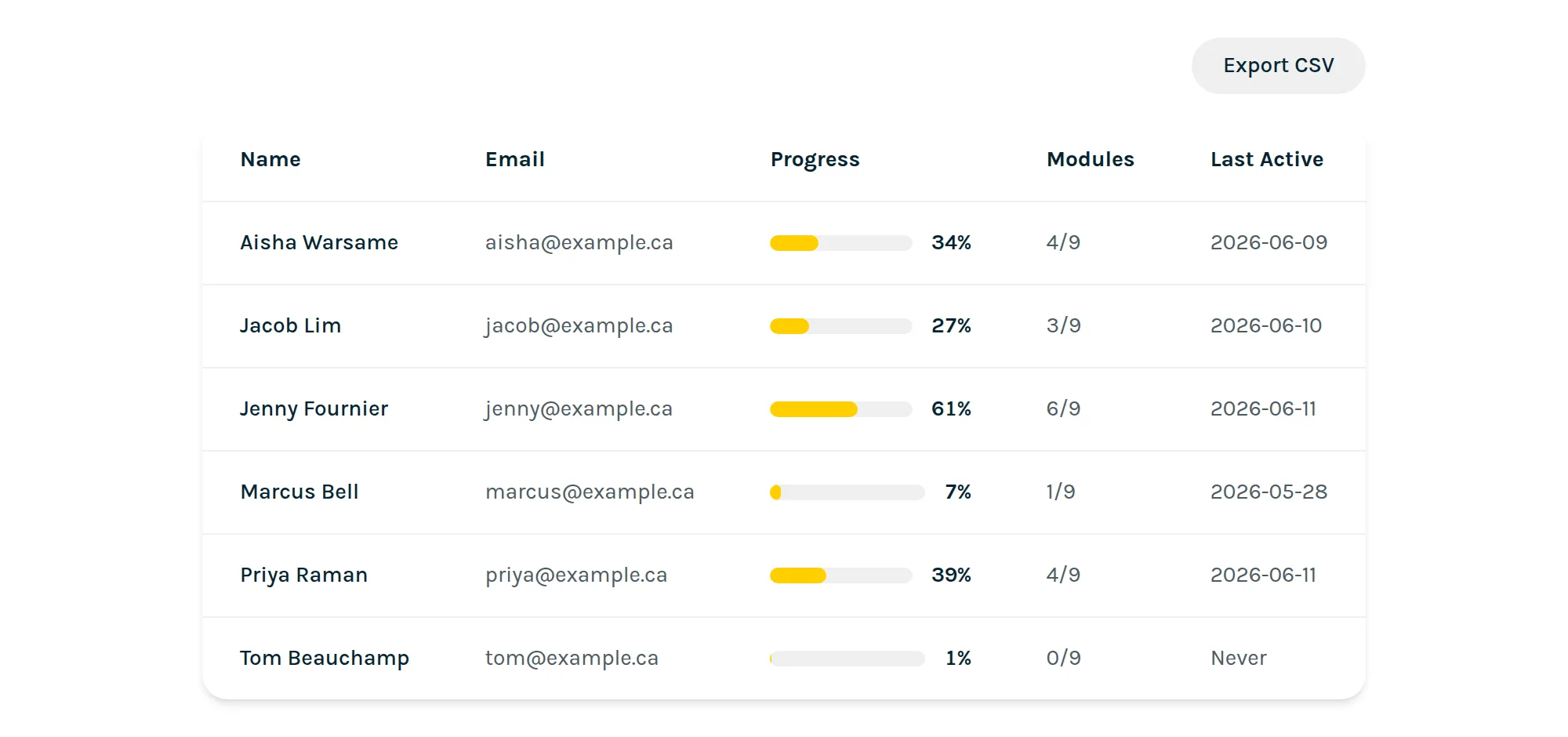
A teacher's class roster listing six students with their progress percentage, modules completed and when they were last active, and an export CSV button.
A class roster. Progress is per lesson, not one number for the whole course.

What the adult running a group sees

Which lesson each person finished and when, rather than a single percentage. Open a student and you get their work, module by module, with somewhere to write back. There is no mark and no gradebook on assignments, which is the right shape for a club and a deliberate choice for a classroom.

One account type covers teachers, parents and camp leaders. The wording says teacher in a few places, which we know is not quite right for the other two.

What the platform does not do

Worth knowing before you plan around it.

  • There is no school or district account. Each teacher has their own class list, and nobody can see across teachers.
  • There is no Google Classroom or Clever integration, so a class is invited by link or by pasting addresses.
  • There is no native app. Everything is a web page, deliberately, because the backer flow is somebody tapping a link in a text message.
  • Module 9's videos are written but not filmed, and it is the one module without a teacher guide.
  • The course videos do not have captions yet, which is the accessibility gap we consider most serious.

The one that is not a gap: no money passes through Hatchable, and that is on purpose. It is why a student under 18 can run a shop here when they could not open a merchant account anywhere else. The page for parents goes through exactly how that works.

Have a look at the real thing

Modules 1 to 8 are published in full, so you can read every lesson before making an account.